
Before the Bot: AI Workflow Automation and the Analysis It Depends On


Share the page:
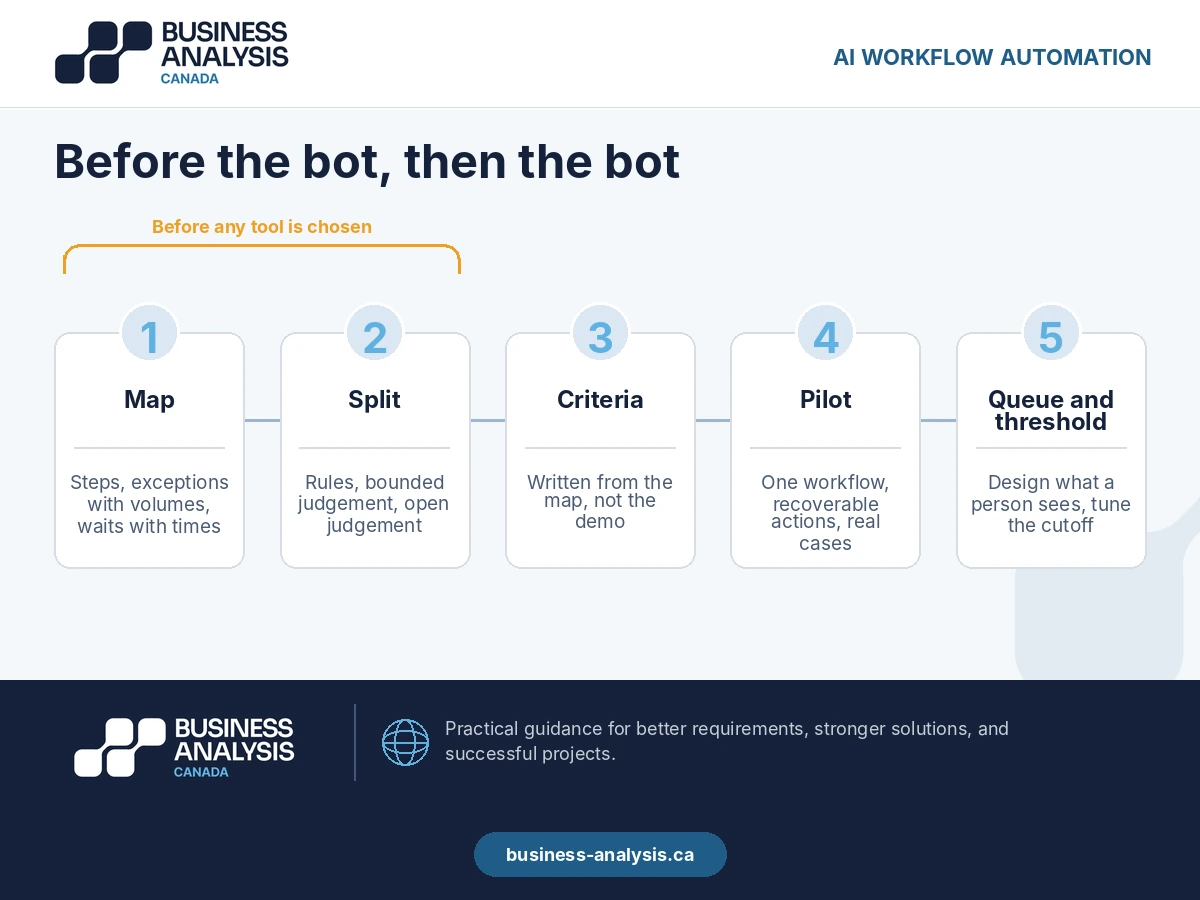
Most AI workflow automation projects start at tool selection. The decision that determines whether they pay off happens earlier: mapping the workflow as it runs today, including the exceptions nobody wrote down, and sorting each step into rule, judgement, or exception before choosing what the bot gets. Automate an unmapped workflow and you automate its exceptions at machine speed. Camunda's 2026 survey of 1,150 IT leaders found that 71% of organizations say they use AI agents, while only 11% of agentic use cases reached production in the past year. This guide covers what the map has to contain, how to split the steps, how to pick tools without picking first, and what the finished pattern looks like.
Introduction
The demo takes four minutes. An invoice arrives, the AI reads it, matches it to a purchase order, and posts it. Everyone in the room can see the headcount saving.
Nobody in the room has seen the spreadsheet the accounts payable clerk keeps for invoices that do not match, which is roughly a third of them. It is not in the demo because it is not in any system. It lives on her desktop, and she is the only person who knows the rules in it.
That spreadsheet is the workflow. The four-minute demo is the happy path through it.
What is AI workflow automation, and where does it fail?
AI workflow automation is the use of AI models, alone or alongside rules-based automation, to execute the steps of a business process with reduced human involvement: reading unstructured inputs, classifying, extracting, deciding within defined bounds, and passing work between systems.
The technology is not where it fails. It fails at the boundary between the workflow the project team documented and the workflow the operations team runs. The documented version has six steps. The real version has six steps and fourteen exceptions, and the exceptions are where the time goes.
Camunda's 2026 State of Agentic Orchestration and Automation report, drawing on 1,150 IT leaders, found that while 71% of organizations say they use AI agents, only 11% of agentic AI use cases reached production in the previous twelve months.<sup>[1]</sup> The same survey found that half of respondents believe unmanaged agentic AI risks amplifying poorly implemented processes and automations rather than fixing them.
That gap between using and shipping is the pilot that worked on the happy path and stalled on the first exception the team had never seen. The pattern we see is a bot handling 60% of volume cleanly and creating a new manual queue for the other 40%, which is now harder to work because a machine touched it first.
Key Takeaway: The bot inherits the process exactly as it is. If the process is undocumented, the bot is undocumented.
Scoping an automation and not sure the workflow is understood well enough to hand over? Our Low-Code & RPA practice maps it first. Book a free consultation.
What has to be mapped before anything is automated?
Five things, and the last two are the ones the demo never shows.
| What the map captures | The question to answer | What breaks if it is missing |
|---|---|---|
| Triggers and inputs | What starts the work, in what form, from where? | The bot waits for inputs that arrive another way |
| Steps and systems | Each action, who does it, in which system, with which fields? | Scope grows in build as hidden steps surface |
| Decisions and rules | At each fork, what decides, and can it be written as a rule? | Judgement calls get automated as rules and go wrong quietly |
| Exceptions and their volume | What falls off the path, how often, and who catches it? | The bot handles the easy third and creates a queue for the rest |
| Handoffs and waits | Where does work sit, for how long, waiting for whom? | The bottleneck stays; the bot speeds up the part that was never slow |
The exceptions row needs a number, not a description. "Sometimes the PO number is missing" is not mappable. "Eleven percent of invoices arrive without a PO number, and the clerk resolves them by searching the vendor name in the ERP and phoning procurement if there are two matches" is a step you can decide what to do with.
The handoffs row is where most of the cycle time hides. A process that takes nine days end to end usually contains about forty minutes of work. Automating the forty minutes changes nothing a customer can see. Finding the eight and a half days of waiting is the analysis.
Teams rarely skip the map because they think it is unnecessary. They skip it because the people who know the exceptions are busy running the process and nobody has been assigned to sit with them. ID Business Analysis assigns a process analyst to do exactly that as the first deliverable of an automation engagement, producing a workflow map with exception volumes and wait times measured from the last ninety days of actual cases, so the automation is scoped against the real process rather than the one in the demo.
Key Takeaway: Five things on the map, two of them measured. Exceptions with volumes, handoffs with wait times.
Which steps should AI handle, and which should stay with people?
Sort every step into one of three buckets before choosing any tool. The buckets decide the tool, not the other way round.
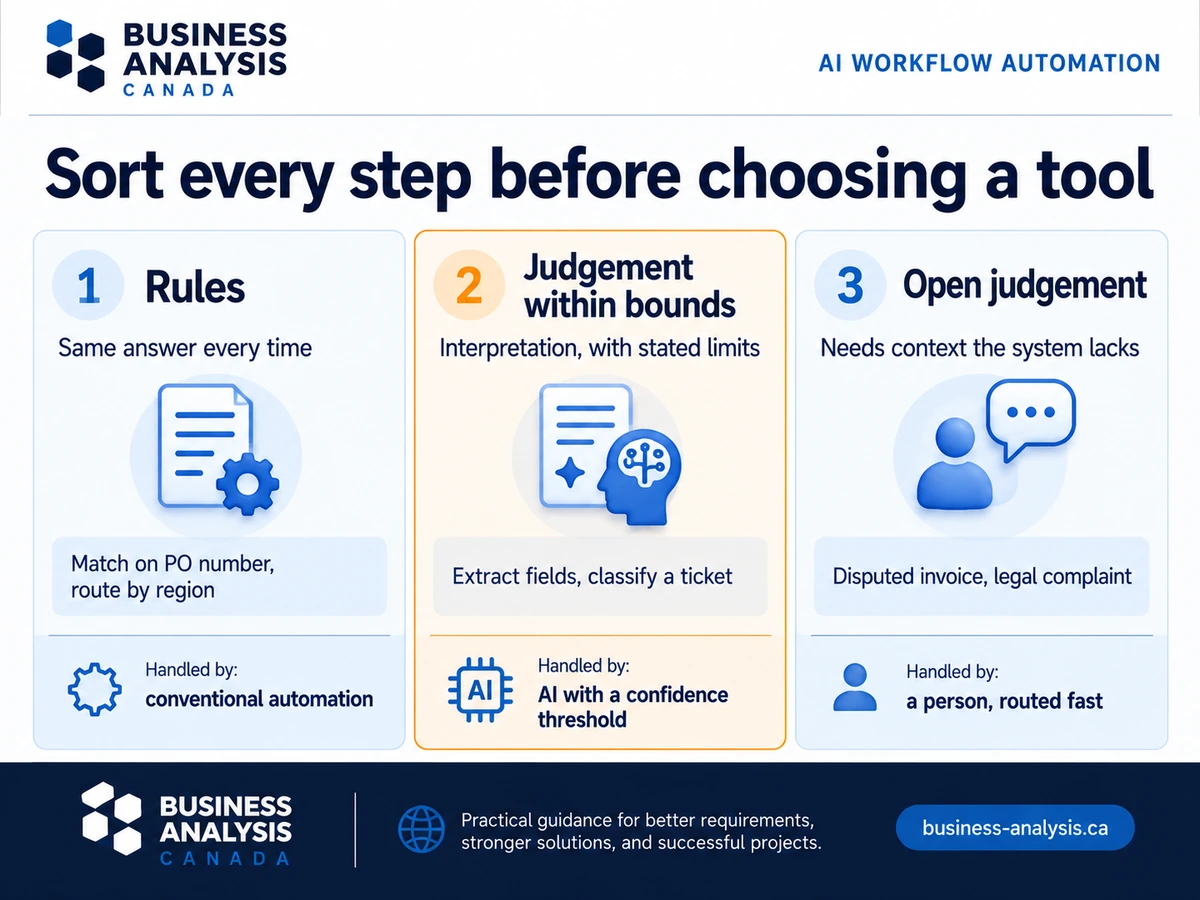
- Rules. The step can be written as a condition and an action, and a person following the rule would get the same answer every time. Match on PO number, route by region, apply the standard rate. This is conventional automation territory. AI adds nothing here except cost and unpredictability.
- Judgement within bounds. The step needs interpretation of unstructured input or a decision with tolerance, but the bounds can be stated. Extract fields from an invoice in any layout. Classify a support ticket into one of twelve categories. Draft a reply for review. This is where AI for workflow automation earns its place, with a confidence threshold and a fallback to a person below it.
- Exceptions and open judgement. The step needs context the system does not have, a conversation, or a decision with consequences that cannot be bounded. Resolving a disputed invoice with a vendor. Deciding whether a customer complaint is a legal matter. These stay with people, and the automation's job is to route them there fast with everything attached.
The common mistake is putting bucket three into bucket two because the model can produce a plausible answer. Plausible is not the standard. The standard is that a wrong answer is caught before it costs anything, and for open judgement it usually is not.
Key Takeaway: Rules get conventional automation, bounded judgement gets AI with a threshold, open judgement gets a fast route to a person. Decide the bucket before the tool.
How do you choose AI workflow automation tools without choosing first?
Write the selection criteria from the map, then look at tools. Every criterion should trace to a row on the map or a bucket in the split.
Criteria that come from the analysis, in the order they usually matter:
- Exception handling. How does the tool route a case it cannot handle, with what context attached, to whom, and how fast? Ask to see it, not hear about it. This is the criterion the demo is designed to avoid.
- Confidence and thresholds. For every AI step, can you set the confidence below which the case goes to a person, and can you change it without a developer?
- System reach. Does it connect to the actual systems on the map, including the old one everyone wants to forget, using the fields the map names?
- Audit and reversal. Can you see what the tool did, why, and undo it? Non-negotiable for anything that posts, sends, or approves.
- Change cost. When the process changes, and it will, who changes the automation and what does it cost?
Notice that none of these is about which AI model the tool uses. Model quality is table stakes and changes every quarter. Exception handling and change cost are what you live with for five years.
Key Takeaway: If the criteria list was written before the map, throw it out and start again. Tools are chosen against the process, not against each other.
What does an AI automation workflow look like when it goes right?
The finished pattern is the same across sectors, and it is less dramatic than the demo.
The invoice case again. After mapping, the team found that 63% of invoices matched cleanly, 25% needed field extraction from non-standard layouts, and 12% needed a person. The rules engine took the first group. AI extraction with a confidence threshold took the second, with anything below the threshold joining the third. The third group went to the clerk with the invoice, the candidate POs, and the vendor history attached, in a queue that had never existed before because the work used to arrive as email.
The clerk's spreadsheet became the exception rules for the routing step. She now handles the 12% in about a fifth of her previous week, and the cycle time for the 88% dropped from nine days to two, because the wait for her attention was the bottleneck all along.
Nothing in that pattern required agentic capability. It needed a map, a split, and a queue. The optimization techniques that mattered were process ones: remove the wait, attach the context, measure the threshold. AI did one bounded thing well in the middle.
Key Takeaway: The win is rarely the AI step. It is the wait that the map exposed and the queue that replaced the email.
Frequently Asked Questions
What is the difference between AI workflow automation and RPA?RPA executes fixed, rules-based steps in the user interface of existing systems, exactly as a person would click through them. AI workflow automation adds steps that need interpretation of unstructured input or a bounded decision: reading a document in any layout, classifying a request, drafting a response. Most production automations combine the two, with RPA or an integration platform doing the deterministic work and AI handling the interpretive steps inside a confidence threshold.
Is agentic AI workflow automation different from using AI agents in a workflow?In practice the terms describe the same thing at different levels of autonomy. An AI agent inside a workflow handles one bounded step and hands the result to the next step. Agentic workflow automation lets the agent plan across steps and take actions with less human review between them. The second needs a written authority boundary before production, covering scope of access, permitted actions, escalation triggers, rollback, and audit. If those five are not specified, treat the deployment as a bounded agent and keep a person between the steps.
How do we start an AI workflow automation project without buying a tool first?Pick one workflow where the volume is high, the exceptions are known to exist, and the cost of a wrong action is recoverable. Map it as it runs today, with exception volumes and wait times from real cases, and sort the steps into rules, bounded judgement, and open judgement. ID Business Analysis delivers that as a fixed-scope workflow assessment, with a process analyst producing the map, the three-bucket split, and the tool criteria that follow from them, so vendor demos are scored against your process instead of the other way round. Tool selection comes after, and it is usually short once the criteria exist.
How long does it take to automate a workflow with AI?Mapping and splitting a single workflow of moderate complexity typically takes two to four weeks, most of it sitting with the people who run it. Build and pilot depend on the tool and the number of systems involved. The step teams most often underestimate is the exception queue: designing what a person sees when a case is routed to them, and measuring whether the threshold is set right, takes longer than the AI step itself and matters more.
Conclusion
The demo shows the happy path. The value is in what the map shows: the exceptions with their volumes, the waits with their durations, and the split between what a rule can do, what AI can do within bounds, and what needs a person with the right context attached.
If you are looking at an automation proposal and cannot say what percentage of cases fall off the path or how long work waits between steps, ID Business Analysis's Low-Code & RPA practice produces the workflow map with those numbers as the first deliverable, before any tool is chosen. Book a free consultation and bring the process everyone says is simple.
Sources
- Camunda, 2026 State of Agentic Orchestration and Automation Report, January 2026, survey of 1,150 IT leaders. https://camunda.com/state-of-agentic-orchestration-and-automation/