
Before the Dashboard: Requirements Gathering for Power BI and Reporting Projects



Share the page:
A dashboard is a set of decisions with charts attached, and most dashboard requests name the data without naming a decision. Dashboard requirements fix that before anyone opens Power BI: who decides what, how often, at what threshold, and what they do next. The core artifact is the KPI definition, one agreed formula, source, grain, owner, and refresh per number, because a KPI with two definitions produces two meetings about which one is right. This guide covers the questions that define a dashboard, how to define a KPI so two teams get the same figure, what belongs in the requirements document, and how to know the dashboard is done. The document template is a download at the end. For the sponsor or BI lead handed a request.
Introduction
The request arrives as a screenshot of someone else's dashboard. Sometimes it is a competitor's, sometimes a vendor's demo, sometimes a slide from a conference. The message says "we need something like this," and a developer is assigned to build something like that. Three months later it exists, it refreshes nightly, and the meeting it was meant to serve still runs on the spreadsheet the controller keeps on her desktop.
That gap is not a Power BI problem. The dashboard was built from a picture rather than from a decision, so nobody can say which number on it anyone is supposed to act on. If you have been handed a request like that and want to turn it into something a developer can build and a manager will open twice, this guide is the work to do first, and it takes days, not months.
What are dashboard requirements, and why do most dashboards skip them?
Dashboard requirements describe the decisions a dashboard must support, the people who make them, the numbers those decisions rest on, and the rule for each number, written before design or development starts. They are not a list of charts. A chart is a design choice made after the requirement says what question the chart has to answer.
Most dashboards skip this stage for a reason that sounds sensible: the data already exists, so why not show it. The result is a dashboard organized by what the warehouse contains rather than by what anyone needs to know on a Tuesday morning. It has twelve tiles, each one accurate, and no path from any tile to an action. The earlier analysis of why BI dashboards go unused traces the adoption gap back to this stage; the short version is that a dashboard nobody has to open gets opened by nobody.
The second reason is political. Writing a requirement forces the question "who owns this number," and in most organizations the honest answer is that finance and operations each own a different version of it. Skipping requirements avoids the argument for three months and then reconvenes it in front of the executive team, with the dashboard as evidence.
Key Takeaway: Write the decision before the chart. If a tile cannot be traced to a decision someone makes on a schedule, it is decoration, and it will be ignored along with everything next to it.
Which questions define a dashboard before anyone opens Power BI?
Eight questions, asked of the people who will use the dashboard rather than the people who asked for it, define the whole thing. The answers fit on two pages, and a developer can build from them.
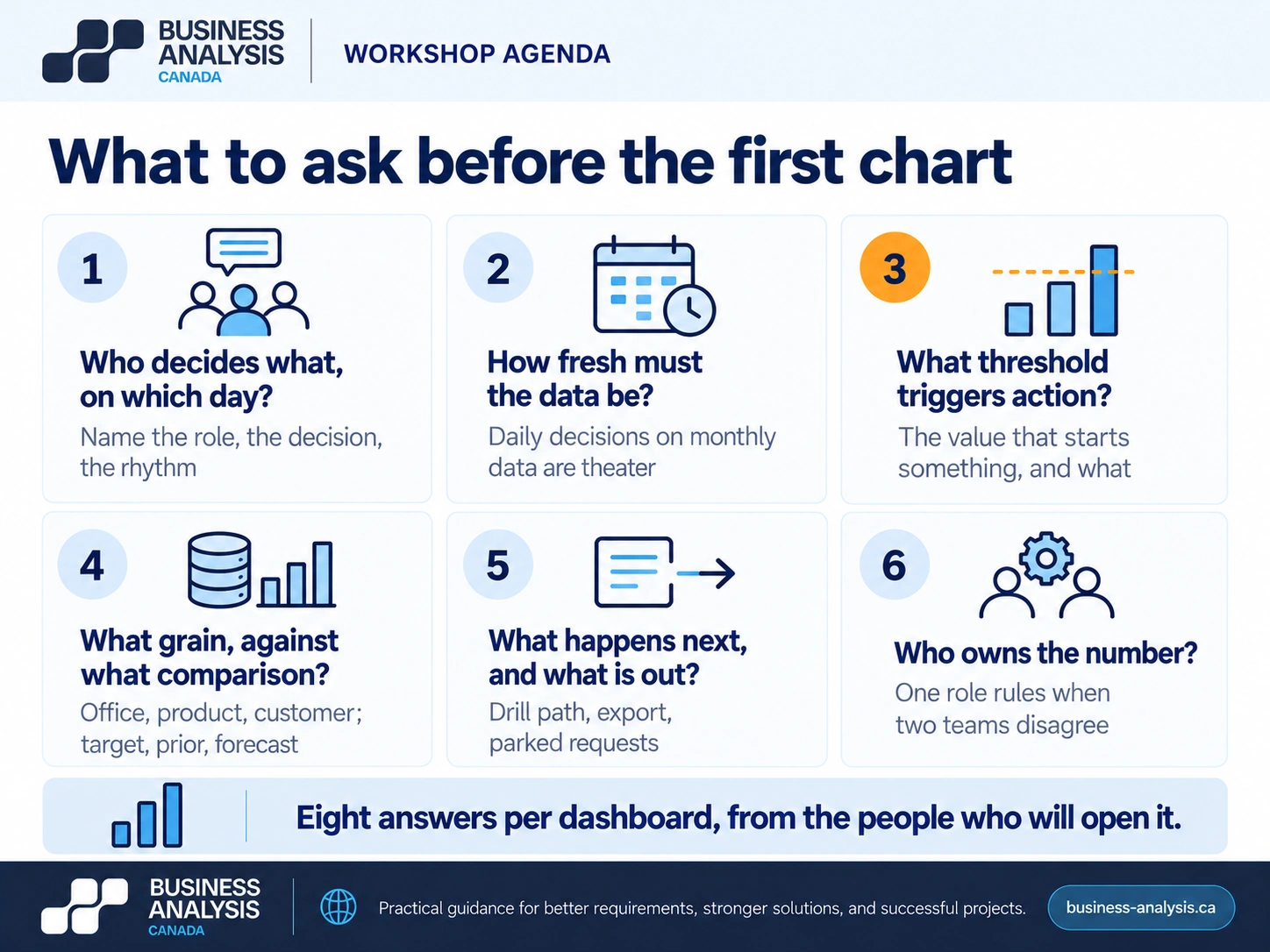
Who decides what, on which day? Name the role, the decision, and its rhythm: the regional manager reallocates field staff every Monday; the controller releases held invoices daily. A dashboard with no named decision-maker has no user. How often does the decision recur, and how fresh does the data need to be for it? Daily decisions on monthly data are theater. What threshold turns a number into an action? If days sales outstanding passes 45, collections calls start; if it does not, nothing happens, and the tile exists to confirm that nothing needs to happen. At what grain does the decision happen: by office, by product line, by customer, by day? The grain decides the data model, and getting it wrong is the most expensive rework in BI. What is the comparison: target, prior period, forecast, peer? A number without a comparison is a fact, not a signal. What does the user do next, and does the dashboard need to lead there, with a drill-through, a link, or an export? What is out of scope, written down, so the second month's requests have a place to go? And who owns each number: the one person who can rule on its definition when two teams disagree.
The visual below is the list, and it is also the agenda for the first workshop.
The failure we see most often is the dashboard built from a data export rather than from these answers: fifteen measures the warehouse happened to hold, no thresholds, no owners, and a request for "trends" that nobody can act on. ID Business Analysis Canada runs the eight questions as the first week of a Business Intelligence engagement and delivers the decision inventory and the metric dictionary before any Power BI work starts, which is how the insurance Power BI program was run: one agreed definition, formula, data source, owner, and refresh frequency per KPI, underneath about thirty dashboards delivered across two years.
Key Takeaway: Decision, rhythm, threshold, grain, comparison, next action, exclusions, owner. Eight answers per dashboard, before design, from the people who will open it.
How do you define a KPI so two teams get the same number?
Write the KPI down as a definition with ten fields, agree it with the one owner, and publish it where both teams can see it. A KPI that exists only as a column name in a dataset will be computed three ways by the third month. The definition is the requirement; the visual is its presentation.
The ten fields, and why each one exists, with days sales outstanding as the worked example.
The pattern we see most often is gross margin. Sales computes it on list price less discount; finance computes it after freight, returns, and rebates; the dashboard shows one of them without saying which, and the first executive meeting it reaches is spent on the difference rather than on the margin. The fix is the owner field. One person rules, the other definition gets its own name if it is still needed, and both appear on the dashboard with their names, not as "margin." Keep the definition set small at first; ten KPIs defined this way beat forty defined as column names.
Key Takeaway: One name, one formula, one owner, one reconciliation figure per KPI, published before build. If two teams can still get two numbers, the definition is not finished.
What belongs in a dashboard requirements document?
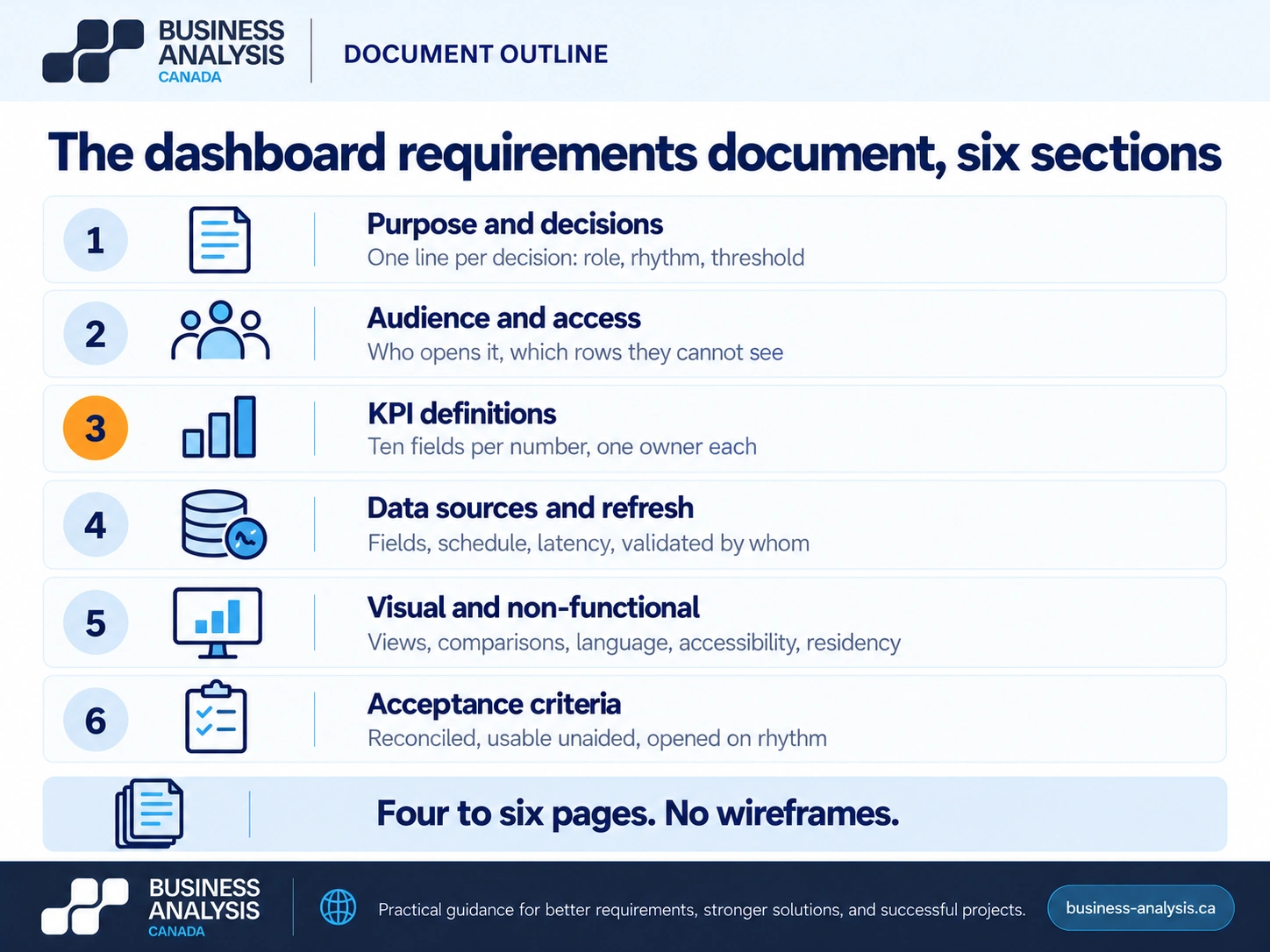
Six sections, and the whole document should fit in four to six pages for a typical departmental dashboard. Longer than that and nobody who signs it has read it.
Purpose and decisions: the decision inventory from the eight questions, one line per decision with role, rhythm, and threshold. Audience and access: who sees what, including the rows they are not allowed to see, which in Power BI becomes row-level security and has to be designed before the data model, not bolted on after. KPI definitions: the ten-field table for each number, which is the metric dictionary. Data sources and refresh: each source system, the fields taken, the refresh schedule, and the latency the decisions can tolerate; this is also where the question of whether the source data is trustworthy gets asked, and the answer is often the real project. Visual requirements, kept short: the grain of each view, the comparisons shown, the drill paths, and any constraints like bilingual labels, accessibility, or mobile use. Acceptance criteria: how the dashboard will be shown to be correct and useful, covered in the next section.
Two sections generic templates include and this one leaves out on purpose. A wireframe of every page: that is design, it comes after the requirements, and drawing it first anchors everyone to a layout before the decisions are known. And a list of "nice to have" charts: either a chart serves a decision in the inventory or it waits for the next release.
Canadian specifics belong in the visual requirements section. Bilingual labels and date formats if the audience spans English and French operations; accessibility to WCAG 2.1 AA for public-sector and federally regulated organizations, which affects color use for thresholds; and data residency where a contract or statute says so, which can decide where the Power BI tenant lives.
Key Takeaway: Six sections, four to six pages, no wireframes. The metric dictionary is the section people will still be using two years after the dashboard has been redesigned twice.
How do you know the dashboard is done?
When every decision in the inventory has a view that supports it, every KPI reconciles to its named figure within tolerance, and the users who will open it can answer their own questions from it without help. Those three are the acceptance criteria, and they are written before the build so the developer knows what done means.
Reconciliation is the one teams skip. Every KPI definition names the figure it must agree with: the month-end AR report, the payroll register, the general ledger. Acceptance is a signed comparison, one line per KPI, with the variance and the explanation if the variance is not zero. A dashboard that has not been reconciled is a rumor with a refresh schedule. The revenue leakage analysis shows what happens when numbers nobody trusts drive decisions anyway.
Usability is tested the same way UAT tests a system: the controller sits down with the dashboard and her Monday questions and answers them unaided while someone watches. Where she opens the spreadsheet instead, the requirement was missed. Where she asks what a number means, the definition is not on the dashboard, and it should be, as a tooltip or a glossary page one click away.
Then the thirty-day check. Usage logs tell you who opened it and how often; compare that with the decision inventory. A decision with a weekly rhythm and zero opens in a month means the dashboard is not in that decision's path, and the fix is usually a link from wherever the decision is made, not a redesign.
Key Takeaway: Done means reconciled, usable unaided, and opened on the decision's rhythm. Write all three into acceptance before the first tile is built.
Frequently Asked Questions
What is a dashboard requirements document?A dashboard requirements document records the decisions a dashboard supports, who makes them and how often, the definition of every KPI with formula, source, grain, owner, and refresh, the data sources and their refresh schedule, access rules including which rows each role may see, and the acceptance criteria. It is written before design and development, runs four to six pages for a departmental dashboard, and its KPI section becomes the metric dictionary the organization keeps using after the dashboard changes.
How long does requirements gathering take for a Power BI dashboard?One to two weeks for a departmental dashboard with a clear owner and two or three source systems. Week one is the decision inventory and the KPI definitions, run as two workshops with the people who will open the dashboard. Week two is source validation, access rules, and acceptance criteria. An executive dashboard spanning several departments takes longer, because each KPI needs an owner and the arguments about definitions have to be settled before build, which is the point of doing it now.
What is the difference between a report and a dashboard?A report presents a defined set of data, usually in detail and often on a schedule, for review or record: an aged receivables listing, a monthly sales report. A dashboard presents a small number of KPIs against comparisons and thresholds so that someone can decide whether to act, and leads to the detail only when they need it. Reports answer "what happened"; dashboards answer "do I need to do something." Many dashboard requests are report requests in disguise, and the eight questions expose which one is being asked for.
Who should gather dashboard requirements?A business analyst or BI analyst, working with the people who will open the dashboard rather than the people who asked for it, because the requester knows the picture and the users know the decisions. ID Business Analysis Canada does this as the opening phase of a Business Intelligence engagement: the analyst runs the decision and KPI workshops, validates sources, writes the requirements document and metric dictionary, and hands the developer a build specification with acceptance criteria attached. The sponsor approves the document before Power BI work starts.
Conclusion
The screenshot that started the request was somebody else's answer to somebody else's decisions. The work is to find yours: who decides what, on which day, against which threshold, from which number, defined once and owned by one person. That takes a week or two, fits in six pages, and is the difference between a dashboard that refreshes nightly and one that gets opened.
If a dashboard request has landed on your desk and the decisions behind it are not written down, ID Business Analysis Canada's Business Intelligence practice runs the decision inventory, the KPI definitions, and the requirements document as the first phase, before design, and hands the build team a specification with reconciliation and acceptance criteria attached. Book a free consultation and bring the screenshot; the first thing we will do is ask what decision it was meant to serve.
Sources
- Business Analysis Canada, Power BI Dashboards and Reporting for an Insurance Provider, case study: metric dictionary with one agreed definition, formula, data source, owner, and refresh frequency per KPI; about thirty dashboards, 2022 to 2024.
- Microsoft Learn, Row-level security (RLS) with Power BI.
- Business Analysis Canada, Why BI Dashboards Go Unused: The 2026 Adoption Gap, business-analysis.ca blog.
- Business Analysis Canada, Follow the Money: Revenue Leakage Examples and the Process Gaps Behind Them, business-analysis.ca blog, September 2026.
- Business Analysis Canada, UAT Testing Explained, business-analysis.ca blog, October 2026.