Build, Buy or Power Apps: Low-Code vs Custom Development for Internal Tools



Share the page:
TL;DR
Power Apps and custom development are not two prices for the same thing. They are two sets of constraints, and the right one depends on six things you can measure before anyone builds: where the data already lives, the per-user license cost over five years, how many integrations and which connector class, whether the tool must work offline or over large row counts, how long it will live, and what you can take with you when you leave. This guide scores the six, names the limits Power Apps projects hit, sets out the governance that keeps business-built apps from becoming orphans, and lists the requirements that hold whichever route wins. Written by a firm that does not resell licenses, for the IT or operations lead choosing a route.
Introduction
The version we see most often is an inspection tool. A business analyst in operations builds a quick Power App on top of a SharePoint list because the paper form was late every week, and it works, and everyone is pleased. Fourteen months later the list holds a few thousand inspections, the search stops finding records nobody can explain, the app has been copied three times for three regions, the person who built it has moved to another department, and the field crews are back on paper for anything older than last quarter. IT is asked to "rebuild it properly," and the estimate for a custom application comes back at $240,000. The sponsor now has two answers, both wrong for the same reason: nobody has written down what the tool has to do.
If you searched for Power Apps vs custom development, you are probably at one of those two moments, the quick app or the expensive rebuild. The choice between low-code and custom development is a decision about constraints, not about price, and it can be made on six criteria before anyone opens a design tool. What follows covers the real difference between the routes, the six criteria and how to score them, where Power Apps projects run into limits, what governance looks like when business teams build their own apps, and the requirements that stay the same whichever route you take.
What is the real difference between Power Apps and custom development?
Power Apps is a platform for building applications by configuration and formulas, on Microsoft's runtime, against Microsoft's data services and connectors, under Microsoft's licensing. Custom development is code your organization owns, on a runtime it chooses, against a data store it designs, with licensing limited to the infrastructure. The difference is not that one is fast and the other is slow, although the first app on each route usually is. The difference is who holds the constraints.
On the Power Apps route, the platform holds them. How a list of fifty thousand rows is filtered, whether the app works without a signal, how many requests a user may make in a day, what the data model can and cannot express, and what each user costs per month are decided by Microsoft, published in its documentation, and changed on its schedule. In exchange you get a working application in weeks, a security model inherited from Microsoft 365, and no infrastructure to run. For a large share of internal tools, that trade is right, and the quick app in the pattern above was a reasonable first move.
On the custom route, your organization holds the constraints, which means it has to set them: an architecture, a hosting choice, a build pipeline, a security review, a support rota, and developers who will still be there in year four. In exchange you get exactly the behavior you specify, no per-user license line, and an asset you can move. For a tool with thousands of users, complex rules, or a life measured in a decade, that trade is right too.
The mistake is treating the choice as build versus buy, which is the language of the RFP guide and belongs to a different decision. Power Apps is not a product you buy; it is a platform you build on, and the decision is which set of constraints your tool can live inside for its whole life. That is a question of measurement, not preference, and the next section gives the six measurements.
Key Takeaway: Power Apps and custom development differ in who holds the constraints: the platform or your organization. Decide by measuring whether the tool can live inside the platform's constraints for its whole life, not by comparing the first estimate.
Which criteria decide between low-code and custom?
Six, each measurable in a week, and each pointing one way or the other. Score them before the design starts, because every one of them is cheaper to discover now than after the app has three regional copies.
- Data gravity. Where does the data already live? If the records are in Dataverse, SharePoint, or Dynamics 365, Power Apps is the native front end and custom development means building and securing a path to data Microsoft already secures. If the data lives in a line-of-business database, an on-premises system, or a data store that does not exist yet, the pull is the other way, and the integration count below rises.
- User count and the licensing math. Power Apps is priced per user per month for anything beyond standard connectors. At the time of writing, Microsoft lists Power Apps Premium at US$20 per user per month on annual billing, rising to US$22 on January 1, 2027. For thirty users that is a rounding error against a developer's salary. For 1,200 users it is a six-figure annual line that recurs for as long as the tool exists, and the five-year total is the number to compare with the custom estimate, not the monthly one. Do the arithmetic for the user count you expect in year three, not the pilot.
- Integration count and connector class. Count every system the tool must exchange data with, then check each one against Microsoft's connector list. A standard connector costs nothing extra; a premium connector moves every user of the app onto a paid plan; a system with no connector needs a custom connector or an intermediate service, which is custom development inside a low-code project. Three standard connectors favor Power Apps; one premium connector changes the licensing for the whole user base; two custom connectors are an argument for the other route.
- Offline and performance needs. Will the tool be used where there is no signal, and how many rows will it search? Built-in offline in Power Apps is described by Microsoft for Dataverse-based apps; a canvas app on a SharePoint list has no equivalent. And a query the platform cannot delegate to the data source stops at 500 rows by default, which is the search failure in the opening pattern. Both limits can be designed around, on Dataverse, with delegable formulas. Both are fatal if discovered after launch.
- Expected lifespan and rate of change. A tool that will be replaced when the parent system changes next year favors the route that costs least to abandon. A tool that will run for ten years favors the route whose total cost over ten years is lowest and whose change process the organization can sustain, which is a question about who will maintain it in year six, not about who builds it in month one.
- Exit cost. What leaves with you? Dataverse data exports; a canvas app's formulas can be unpacked for inspection but do not run anywhere else; a custom application's code and database are yours to host wherever you like. Exit cost rarely decides the route on its own, but it decides what the requirements must say about data export, and it is the criterion sponsors forget until the platform's pricing changes.
The table below is the scoring sheet we use. Score each criterion from −2 (strongly favors Power Apps) to +2 (strongly favors custom), weight the criteria that matter most to this tool, and read the total as a direction, not a verdict.
Read the total in three bands. A clearly negative score says Power Apps, and usually Power Apps on Dataverse rather than on a SharePoint list, because Dataverse is where the offline and delegation answers live. A clearly positive score says custom, and the licensing math is usually what put it there. A mixed score, which is most of them, says Power Apps now with the exit written into the requirements: data in Dataverse, rules documented outside the app, and a retirement trigger agreed with the sponsor, so the move to custom in year four is a migration and not an archaeology project.
The failure we see is the score being done by whoever will build the result, which is how a Microsoft partner finds that every tool fits Power Apps and a development shop finds that none of them do. ID Business Analysis Canada scores the six criteria with the sponsor as part of a Discovery Sprint, with the interface inventory, the year-three user count, and the five-year license arithmetic on the page, and writes the requirements in the last section of this guide so that they hold whichever route the score points to; the firm does not resell licenses or development hours, which is what makes the score worth reading.
Key Takeaway: Score six criteria before design: data gravity, users and licensing over five years, integrations and connector class, offline and performance, lifespan and change, exit cost. A mixed score means Power Apps on Dataverse with the exit written into the requirements.
Where do Power Apps projects run into limits?
In five places, all documented by Microsoft, and all survivable if they are found during requirements rather than after launch.
Delegation. A canvas app sends its queries to the data source when the source can run them, which Microsoft calls delegation. When a formula cannot be delegated, the app fetches the first 500 rows by default, runs the formula on those, and stops. Microsoft's documentation is plain about the consequence: a filter that is not delegated "doesn't return record 501 or higher, even if it matches the criteria," and the limit can be raised in settings to 10,000 but not beyond. The inspection app in the opening pattern hit this limit at a few thousand records, which is why the search stopped finding older inspections and why nobody could explain it. The fix is designing the data in Dataverse and writing delegable formulas from the start, which requires knowing the row count in year three before the first screen is built.
Offline. Microsoft describes built-in offline-first behavior for canvas apps as a feature of Dataverse-based apps, with the tables to be synchronized selected by the maker; apps on other sources have only the older local-cache functions, with a data size Microsoft puts in the tens of megabytes. If the field crews work in basements, rural service areas, or plant rooms, the data lives in Dataverse or the tool is custom. There is no third option, and it has to be known before the data model is chosen, because moving a SharePoint-backed app to Dataverse later is a rebuild.
Licensing. The per-user price in the previous section applies the moment the app uses a premium connector or Dataverse. A tool that starts on standard connectors inside Microsoft 365 licensing and later adds a premium connector for one integration changes its cost for every user on the day the connector is added. Microsoft also sets a daily request allowance per licensed user, with Power Apps per-user plans at 40,000 requests in 24 hours and Microsoft 365 licenses with Power Platform access at 6,000, and reserves the right to throttle high usage. A busy app that polls a data source on a timer can reach that number; a well-designed one does not, but the design has to know the number exists.
Platform limits on behavior. The platform decides what a screen can do. Long-running processing moves to Power Automate or to a service; complex layouts hit control limits; large attachments and media have their own ceilings; reporting over the app's data is a Power BI question. Each of these is a requirement that either fits the platform or does not, and the why RPA bots break in production post describes the same failure in a different Microsoft product: the automation was never specified against the platform's limits, so the limits were discovered by the users.
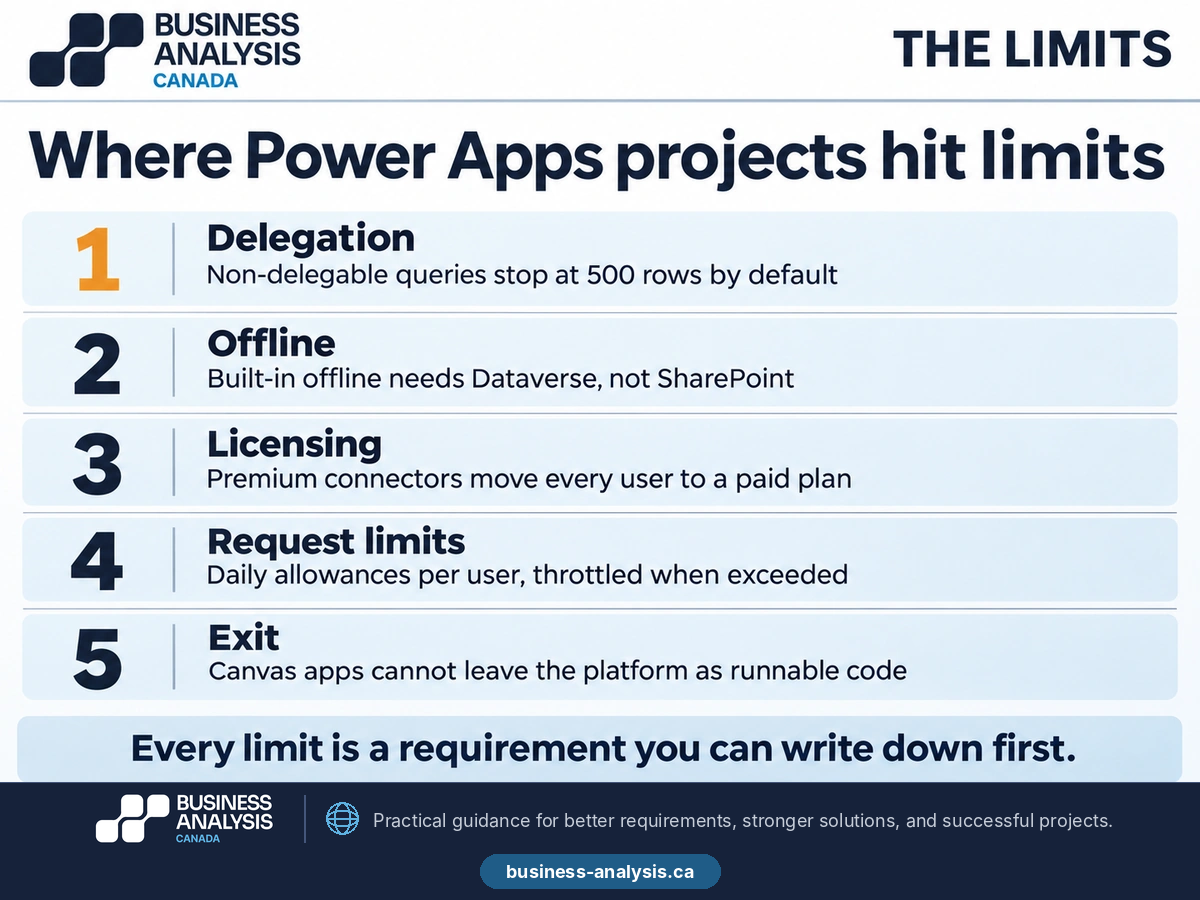
Exit. A canvas app's definition can be unpacked for inspection and source control, but the app runs on Microsoft's runtime and nowhere else. Dataverse data exports. The rules, if they were only ever written in formulas, exist only in formulas. This is why the requirements in the last section matter more on the low-code route than on the custom one: they are the portable copy of what the app does.
Every one of these is a requirement that can be written down first. Row counts, offline locations, the connector class of each interface, the daily request pattern, and the export format are facts about the tool's use, not about the platform, and a business analyst can establish them in the first week.
Key Takeaway: Power Apps limits are documented and survivable: delegation at 500 rows by default, offline on Dataverse only, per-user licensing triggered by premium connectors, daily request allowances, and a runtime you cannot leave with. Each is a requirement to write before the first screen.
What does governance look like when business teams build their own apps?
Like the governance of any other software, applied to people who did not expect to be governed. The strength of Power Apps is that the operations analyst can build the inspection tool; the weakness is that she can also connect it to a personal cloud drive, share it with the whole organization, and leave the department. Governance is the set of rules that lets the first thing happen without the other three.
Four controls carry most of the weight. Environments: separate development, test, and production environments for anything beyond personal use, so that the production app is not edited live. Data policies: Microsoft's data loss prevention policies define which connectors an app in an environment may use, and Microsoft's own guidance is that every environment in the tenant should be protected by a data policy; the policy is what stops the inspection records from being written to a social media connector by accident. Ownership: every app beyond personal use has a named business owner and a named technical owner, and an app whose owner has left the organization is an orphan to be reassigned or retired within a set period. Promotion: an app that crosses a threshold of users or touches data beyond its team is moved from the maker's environment into a managed one, with solutions, source control, and a release process, which is where the business-built app becomes IT-supported without being rebuilt.
A tiering model makes the thresholds explicit. Personal productivity apps, used by one person or a team of five, need a data policy and nothing else. Team apps, with tens of users or data shared beyond the team, need the named owners, a test environment, and a support agreement. Enterprise apps, with hundreds of users, integrations, or regulated data, are treated as any other system: requirements, acceptance testing, change control, and a place in the application portfolio that the legacy system assessment will one day review. Most governance failures are apps that crossed a tier without anyone noticing.
Two Canadian points. Data residency is an environment setting: Microsoft lists Canada as an individual region within the North America macro region geography for Power Platform, so an organization that must keep data in Canada selects the Canada region when the environment is created, and governance has to prevent environments being created anywhere else. For public bodies, Protected B is a scope question: the Canadian Centre for Cyber Security assesses Microsoft cloud services and makes its reports available to departments on request, and the assessed scope is defined service by service, so confirm that the Power Platform services the tool will use are inside the assessed scope rather than assuming the platform inherits it.
Governance is also where the route decision gets revisited. The register of apps by tier, with their user counts and connectors, is the evidence that a team app has become an enterprise one, and the six criteria can be rescored on the facts. A sample of the Power Platform work we have delivered inside those controls is in the Power Apps and Power Automate case study.
Key Takeaway: Four controls: environments, data policies on every environment, named owners for every app beyond personal use, and promotion to a managed environment at a user or data threshold. Set the Canada region at environment creation and confirm Protected B scope service by service.
How do you write requirements that work for either route?
By writing them about the business and the data, not about the platform, so that the same document can be handed to a Power Apps maker or a development team and produce the same tool. Six parts of a requirements set survive the route decision unchanged, and they are the parts that were missing from the quick app in the opening pattern.
- The data model. Entities, their keys, their relationships, and who owns each record. An inspection belongs to a site, a site to a region, a region to a manager; an inspection has one status at a time and a history of status changes. This is a diagram and a table, and it is the same whether the tables end up in Dataverse or in a database.
- The business rules. Every validation, calculation, and status transition, stated in plain language with examples. "An inspection cannot be closed with an open critical finding" is a rule; in Power Apps it becomes a formula, in custom code a function, and in the requirements it stays a sentence that a tester can check.
- Roles and permissions. Who can see, create, edit, approve, and delete what, by role and by record ownership. Power Apps inherits the identity from Microsoft 365, custom development builds it, and both need the same matrix.
- The interface inventory. Each exchange of data with another system, its direction, its frequency, its owner, and, for the route decision, its connector class. The inventory is also criterion three in the scoring table, which is why the requirements and the decision are written together.
- Performance and offline scenarios. Row counts expected in year three, the longest filter users will run, acceptable response times, and the specific places and moments where the tool will be used without connectivity. These are the requirements that expose delegation and offline limits on the low-code route and size the infrastructure on the custom one.
- Acceptance criteria. Given, when, then, for every rule and every screen, written so that they can be run against either implementation. The acceptance criteria guide gives the form; for internal tools the criteria are also the regression test for every change the business team makes afterward.
Three things are deliberately not in the list. Screen designs, because the platform decides much of the layout and the requirements should describe what a screen must let a user do, not what it looks like. Technology choices, because the point of the document is that it precedes them. And the workflow automation around the tool, which belongs to the analysis that precedes automation rather than to the tool's requirements.
The payoff is at the moment of change. When the tool crosses a governance tier, when the licensing changes, or when the parent system is replaced, the requirements are rescored against the six criteria and the route can move. The organization that wrote them owns the tool's definition; the organization that did not owns a set of formulas and a $240,000 estimate.
Key Takeaway: Write the data model, business rules, roles, interface inventory, performance and offline scenarios, and acceptance criteria before the platform is chosen. They produce the same tool on either route, and they are what lets the route change later.
Frequently Asked Questions
When should you use Power Apps instead of custom development?When the data already lives in Dataverse, SharePoint, or Dynamics 365, the users are already licensed for the connectors the tool needs, every integration has a standard connector, the users are connected or the data is in Dataverse for offline, and the tool's life is measured in a few years with changes the business team can make itself. Score the six criteria in this guide; a clearly negative total says Power Apps, and most internal tools with under a few hundred users land there.
What are the main limitations of Power Apps?Delegation, which fetches 500 rows by default for formulas the data source cannot run, so searches silently miss older records; offline, which Microsoft provides as a built-in feature for Dataverse-based apps rather than for SharePoint or other sources; licensing, which moves every user to a paid plan when a premium connector or Dataverse is used; daily request allowances per licensed user; and exit, because a canvas app runs only on Microsoft's runtime. Each one is a requirement you can establish in the first week.
Is low-code cheaper than custom development?For the first version, almost always. Over five years, it depends on the user count and the connectors, because Power Apps is priced per user per month for anything beyond standard connectors and custom development is priced once plus support. Multiply the year-three user count by the monthly price and sixty months, and compare that with the custom estimate plus five years of support. For thirty users low-code wins easily; for a thousand users the comparison is close enough to need the arithmetic.
How do we decide between Power Apps and custom development for a specific tool?Score the six criteria with the sponsor, in writing, before any design: data gravity, users and licensing, integrations, offline and performance, lifespan, exit cost. ID Business Analysis Canada runs that scoring inside a Discovery Sprint and delivers the decision record with the interface inventory, the license arithmetic, and the route-neutral requirements, so the tool can be built on either route or moved between them later. The firm does not resell licenses or development hours.
Conclusion
The inspection tool in the opening pattern was neither a bad Power App nor a $240,000 problem. It was a tool with no written definition, built on the wrong data store for its row count, and left without an owner, and both of its "answers" were guesses about a question nobody had written down. Scored on the six criteria, it was a Power Apps tool on Dataverse with an offline profile, delegable search, a named owner in operations, and acceptance criteria that the regional copies could be tested against before they were merged. The rebuild estimate was for a tool nobody had specified; the rescue took weeks.
If you have a quick app that has outgrown its list, or a custom estimate for an internal tool that feels large, ID Business Analysis Canada's Low-Code and RPA practice scores the route with you and writes the requirements that hold either way. Book a free consultation and bring the user count you expect in year three; it is the first number we will ask for.
Sources
- Microsoft, Power Apps Premium price update, Microsoft Licensing news, September 9, 2026; US$20 to US$22 per user per month on annual billing from January 1, 2027.
- Microsoft Learn, Understand delegation in a canvas app; default 500-row limit for non-delegable queries, maximum 10,000, delegable data sources.
- Microsoft Learn, Mobile offline for canvas apps overview; offline-first for Dataverse-based canvas apps, LoadData and SaveData alternative.
- Microsoft Learn, Requests limits and allocations; 40,000 requests per 24 hours for Power Apps per-user plans, 6,000 for Microsoft 365 licenses with Power Platform access, enforcement note.
- Microsoft Learn, Data policies for Managed Environments; recommendation to protect all environments with a data policy.
- Microsoft Learn, Macro region geographies in Power Platform; Canada listed as an individual region within the North America geography.
- Microsoft Learn, Canada Protected B compliance offering; CCCS assessments and report availability to Government of Canada departments.
- Business Analysis Canada, Comparable Bids: How to Write an RFP for Software That Canadian Vendors Can Price, business-analysis.ca blog, November 2026.
- Business Analysis Canada, Before the Rewrite: Legacy System Assessment for Modernization Decisions, business-analysis.ca blog, November 2026.
- Business Analysis Canada, Why RPA Bots Break in Production, business-analysis.ca blog.
- Business Analysis Canada, Before the Bot: AI Workflow Automation and the Analysis It Depends On, business-analysis.ca blog, September 2026.
- Business Analysis Canada, Testable or Not Written: How to Write Acceptance Criteria Developers and Testers Can Use, business-analysis.ca blog, November 2026.
- Business Analysis Canada, Power BI, Power Apps, Microsoft D365, Power Automate projects, case study.