
Before the Demos: ERP Requirements Checklist for Mid-Size Canadian Organizations



Share the page:
An ERP requirements checklist is the list of what the system must do, written by business process rather than by module, before any vendor shows a screen. For a mid-size Canadian organization it carries rows that generic templates leave out: sales tax by place of supply across GST, HST, PST, and QST, French-language invoices and software for Quebec, payroll remitter types and year-end slips, EFT files in the Payments Canada standard, and a Canadian hosting region. Each must-have carries evidence of what happens without it; everything else is a configuration preference. The checklist then becomes the demo script every vendor runs with your data in your order, and after selection it becomes the fit-gap input and the UAT scripts. The checklist is on this page.
Introduction
The version we see most often is demo week. Four vendors, four days, a finance lead with a spreadsheet of 180 features copied from a template, and a conference room. Every vendor shows the same things: a dashboard, an approval on a phone, an invoice that posts itself. Two weeks later nobody on the panel can remember which vendor could put HST and PST on one order shipped from Ontario to British Columbia, whether any of them could print the Quebec customer's invoice in French without a workaround, or how the payroll remittance would reach the CRA. The spreadsheet has 180 ticks in it, and the decision is made on the salesperson everyone liked.
If you searched for an ERP requirements checklist, you are probably the finance or operations lead running a selection for an organization of fifty to five hundred people, and the demos are already booked. The checklist on this page is organized by business process, carries the Canadian rows that templates built for American companies leave out, and separates the requirements that would disqualify a vendor from the preferences you would change your practice for. What follows covers what the checklist is and why it precedes the demos, the Canadian rows, the must-have test, the scripted demo, and what the checklist becomes after the contract is signed.
What is an ERP requirements checklist, and why write it before the demos?
An ERP requirements checklist is a structured list of what the system must do for each business process the organization runs, with each line stating the process step, the rule or outcome required, the priority, and the evidence behind it. It is written by the people who run the processes, with an analyst holding the pen, and it is complete when a vendor could price against it and a tester could check it. It is not a feature list copied from a template, which is what most organizations bring to demo week, and the difference shows on the day.
The reason to organize it by process rather than by module is that modules are the vendor's structure and processes are yours. A checklist sorted into "finance, inventory, sales, purchasing, HR" invites each vendor to show the module they are proudest of. A checklist sorted into order to cash, procure to pay, record to report, plan to produce, and hire to retire forces every vendor to walk the same path your staff walk, through the hand-offs where ERP projects fail: the sales order that becomes a pick list that becomes a shipment that becomes an invoice that becomes a receivable with the right tax on it. The digital transformation domains post makes the same argument one level up; the checklist is where it becomes specific.
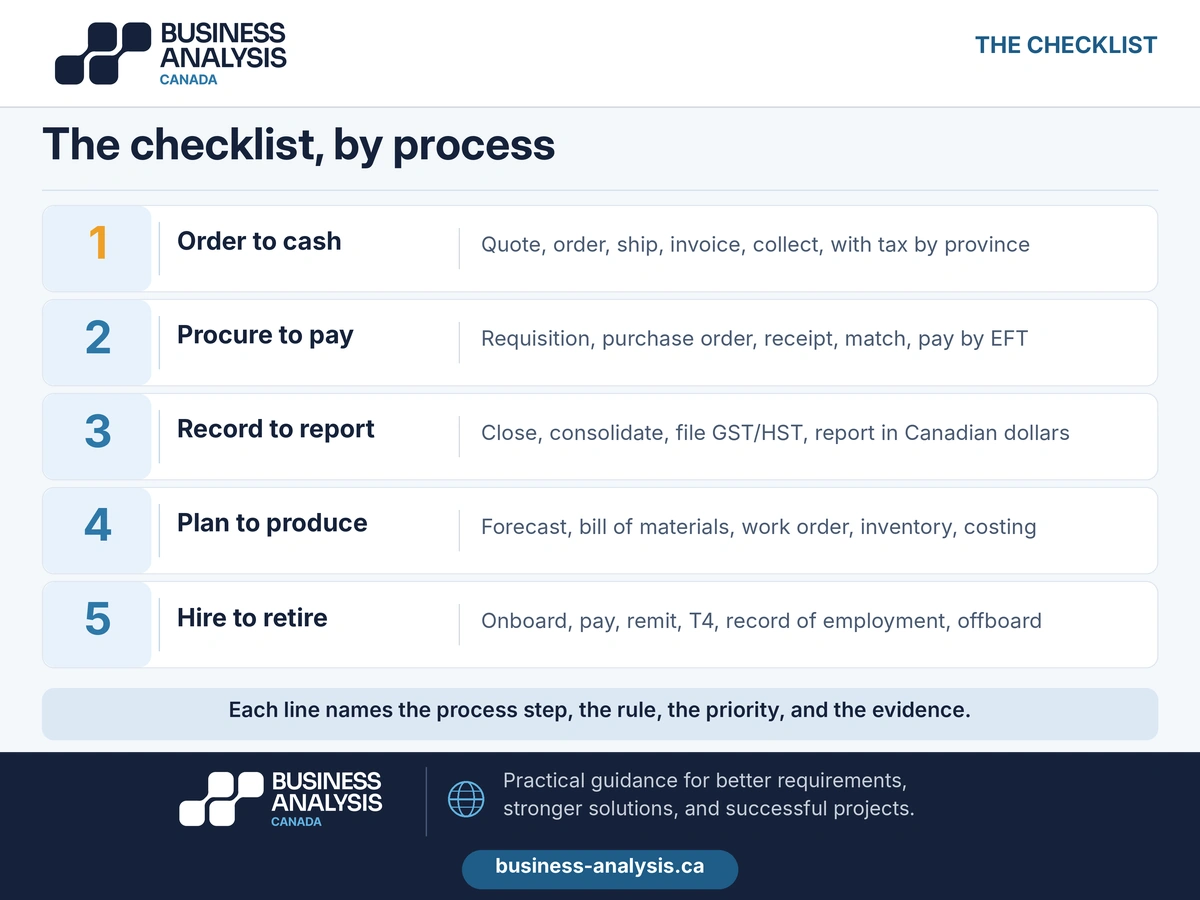
Writing it before the demos is the whole point. A demo you did not script is a demo of what the vendor chose to show, and vendors choose their strengths. The checklist written first turns the demo into a test: the same scenarios, the same data, the same order for every vendor, scored on the day against a rubric the panel agreed before the first vendor arrived. Written after the demos, the checklist becomes a rationalization of a choice already made, and the Canadian rows are the ones that get discovered in month nine of implementation, when the first Quebec invoice goes out in English.
The checklist is also shorter than the template. A mid-size organization usually ends with 150 to 300 lines across five processes, of which thirty to fifty are must-haves. A template with 800 features is not thorough; it is undifferentiated, and the panel cannot score 800 of anything in a four-hour demo.
Key Takeaway: Write the checklist by business process, with the step, the rule, the priority, and the evidence on each line, before the first demo. It turns demo week into a test every vendor sits in the same order, instead of a tour of each vendor's strengths.
Which requirements are specific to Canadian organizations?
Seven areas, and every one of them is a row that templates written for the United States market do not have. They are also the rows most likely to be discovered late, because the vendor's demo company sells in one currency, one language, and one tax jurisdiction.
The sales tax row deserves its own paragraph because it is where mid-size Canadian implementations most often go wrong after go-live. The Canada Revenue Agency's rate table for supplies on or after April 1, 2025 shows the shape of the problem: 5 percent GST in Alberta, the territories, and the PST provinces, HST at 13 percent in Ontario, 14 percent in Nova Scotia, and 15 percent in New Brunswick, Newfoundland and Labrador, and Prince Edward Island, with British Columbia, Saskatchewan, Manitoba, and Quebec adding their own provincial tax on top of the GST. The rates change: Nova Scotia's came down from 15 percent that April. The requirement is not "supports Canadian sales tax." It is "applies the rate by place of supply, holds dated rates so a change takes effect on its date without re-keying, and maps every tax line to the boxes on the return," and the demo check is three orders to three provinces.
The language row is a legal requirement in Quebec, not a preference. Under the Charter of the French Language as amended in 2022, invoices and similar documents for Quebec customers must be drawn up in French, standard-form contracts must be provided in French first, and software an employer provides to employees in Quebec must be available in French unless no French version exists; enterprises with 25 or more employees in Quebec register with the language office and are subject to francization. Confirm the current obligations with counsel for your situation, and write them into the checklist as must-haves, because an ERP that cannot produce a French invoice is not configurable into compliance.
Payroll is a scope decision before it is a requirement. Many mid-size organizations keep payroll with a provider and integrate; the checklist then needs the interface, not the calculation. If payroll comes in-house, the CRA's remitter types set the calendar: quarterly for small employers with an average monthly withholding under $3,000, regular monthly remittance under $25,000, and accelerated schedules at $25,000 and at $100,000 and above. Add the year-end slips, the records of employment to Service Canada, and the Quebec pension and parental insurance plans where staff work in Quebec, and write the interface to the bank as a file in the Payments Canada standard, whose 2024 edition still specifies the fixed-length records Canadian banks exchange, rather than the ACH format most templates name.
The failure we see is the Canadian rows being discovered by the implementation partner after signature, when they are change orders. ID Business Analysis Canada writes the checklist by process in a Discovery Sprint, with the seven Canadian areas filled in against the current CRA, Revenu Québec, and Payments Canada requirements and each must-have tagged with the evidence behind it, and then runs the scripted demos with the panel, so that every vendor has shown the French invoice, the three-province order, and the payment file before anyone talks about price.
Key Takeaway: Seven Canadian rows: sales tax by place of supply with dated rates, French documents and software for Quebec, payroll remitter types and year-end slips or the payroll interface, EFT in the Payments Canada standard, multi-currency with revaluation, Canadian hosting and privacy obligations, units and fiscal calendar. Each has a demo check.
How do you separate must-have requirements from configuration preferences?
With one question per line: would we reject a vendor that cannot do this? If the honest answer is yes, the line is a must-have and it needs evidence. If the answer is "we would change how we work," the line is a configuration preference, and it is scored, not required. Most checklists fail because the question is never asked and every line arrives marked critical by the department that wrote it.
Must-haves come in three kinds, and each kind carries a different sort of evidence. Legal and regulatory requirements, which are the Canadian rows above plus whatever your industry adds, carry the statute or the contract clause. Process-critical requirements, the ones that would stop a shipment, a payment, or a close, carry a volume and a consequence: "we ship 400 orders a day to all ten provinces" is evidence; "we need good tax handling" is not. Integration requirements carry the interface inventory: the system on the other end, the direction, the frequency, the owner. A must-have without evidence is a preference wearing a badge, and the panel should demote it before demo week.
Preferences are everything else, and they matter, because they are where the vendors differ and where the score is decided. The test for a preference is whether the organization could change its practice to fit the product's standard way. Most mid-size organizations should, for most preferences, because the standard way in a mature product has been tested by thousands of customers and the custom way has been tested by nobody. The Power Apps and custom development guide makes the same distinction for internal tools: configuring is cheap and survives upgrades; customizing is expensive and often does not.
Two rules keep the must-have list honest. First, a cap: thirty to fifty must-haves for a mid-size organization, and if a department's list is longer, the extra lines need evidence or they move. Second, a sponsor's signature on the must-have list before the demos, so that the department that wanted everything cannot reinstate its lines after its favorite vendor fails one. The signed must-have list is also the first thing the implementation partner will ask for, and the organizations that have it get a fixed-price quote; the ones that do not get a time-and-materials estimate with a contingency.
A note on the trap in the opposite direction. A legacy process that exists only because the old system could not do something is not a must-have; it is a workaround, and the checklist should not preserve it. The legacy system assessment post covers how to tell the rules the business needs from the rules the old system imposed; for an ERP selection, the short version is to ask, for every must-have, whether the rule would exist if the current system did not.
Key Takeaway: A must-have is a line you would reject a vendor over, with evidence attached: a statute, a volume and a consequence, or an interface. Everything else is a preference the organization could change its practice for. Cap the must-haves, get the sponsor's signature, and drop the workarounds.
How do you turn the checklist into a scripted demo?
By writing the demo yourself, from the must-haves, and sending it to every vendor with the same data and the same order. The checklist is the question bank; the script is the exam; the vendors sit it one after another, and the panel scores each one before the next one walks in.
A script for a mid-size organization has eight to twelve scenarios, one or two per process, each drawn from the must-haves and each with three parts: the starting data, the steps the vendor must perform, and the result the panel expects to see. "Create a sales order for customer 1042 in Quebec for 200 units of item A-200 at the contract price, ship it from the Ontario warehouse, invoice it in French, and show the tax lines and the receivable" is a scenario. "Show us order management" is not. The data is yours: a sample file of customers, items, prices, and open transactions, anonymized where needed, sent to each vendor ten business days before its slot so the demo runs on your products and your provinces rather than on the vendor's demo company.
Three rules apply on the day. The vendor runs your scenarios in your order; the sales engineer who wants to "show you something first" is told no, politely, by the panel chair. For must-haves, the panel asks to see the configuration behind the result as well as the result, because a French invoice can be produced by a template someone built the night before and a tax line can be typed in; the setup screen shows whether the capability is standard. And switching to the vendor's own demo data ends the scenario with a score of zero, which the vendors are told in advance, and which they respect once they see it applied.
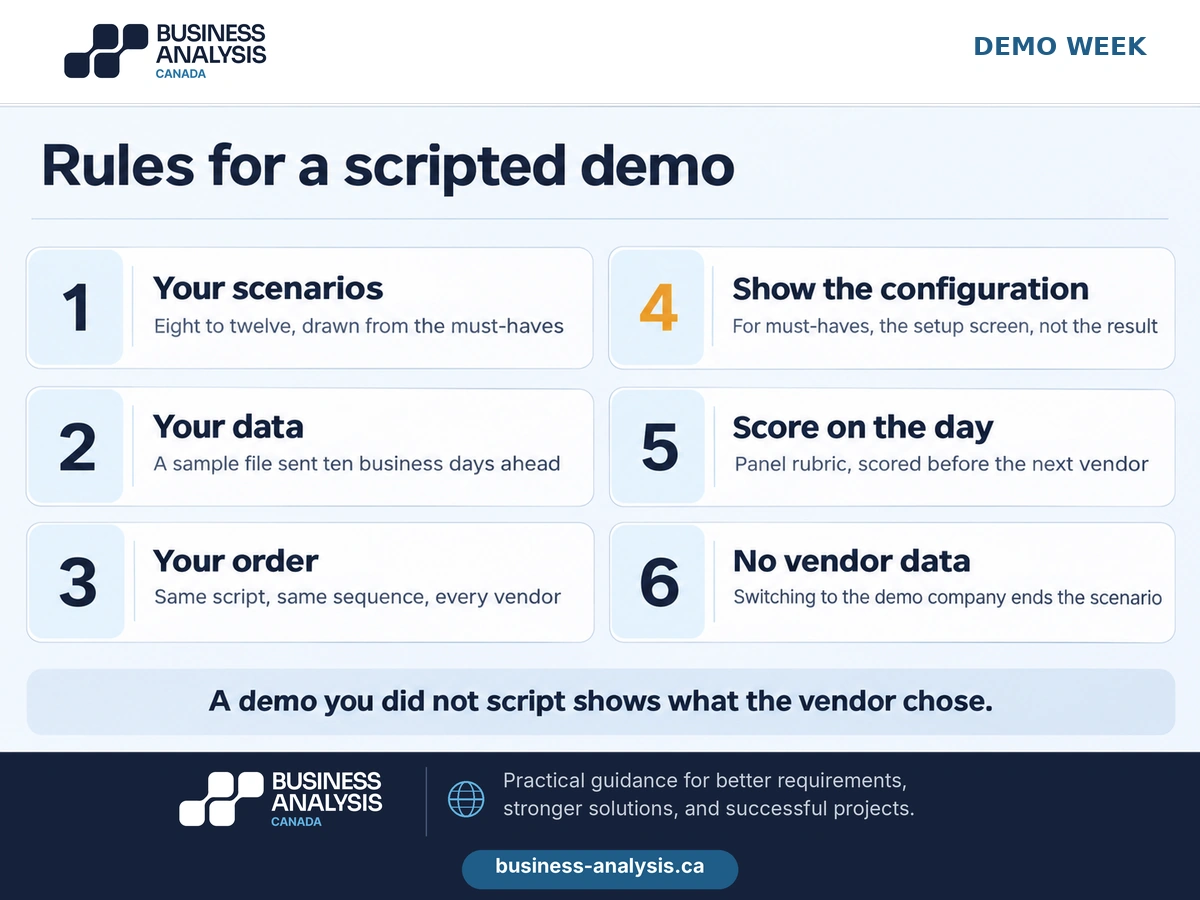
The panel scores each scenario on a rubric agreed before the first demo, with the same four-point scale we use for software RFPs: not available, available through customization, available through configuration, shown as standard in the demo. The RFP guide sets out the evaluation grid and the pricing schedule that wrap around the demo score when the selection is a formal procurement; the demo is the rated criterion that carries the most weight because it is the only one based on what the panel saw rather than on what the vendor wrote. Scores are recorded before the next vendor arrives and are not revised afterward, because memory of a demo decays into an impression of the presenter within a day.
Scripted demos are unpopular with vendors for about a week and then they are not, because the strong ones prefer a fair test to a beauty contest. The vendors who decline to run your script have told you something useful before you spent a day with them.
Key Takeaway: Eight to twelve scenarios from the must-haves, with your data sent ten business days ahead, run in your order by every vendor, scored on the day against a four-point rubric. Ask to see the configuration behind every must-have, and end any scenario the vendor switches to its own data.
What happens to the checklist after selection?
It becomes four other documents, which is why the lines were written with the step, the rule, the priority, and the evidence in the first place. A checklist that stops being useful at contract signature was a shopping list.
First, the fit-gap input. Every line is now assessed against the chosen product as fit, configure, extend, or work around, and the scored demo already holds the answer for the must-haves: the panel saw which ones were standard and which needed configuration. The fit-gap itself is a method of its own and will get its own guide on this blog; the point here is that the checklist is its left-hand column, and an organization that arrives at fit-gap without one spends the first month of implementation rebuilding it at the partner's rates.
Second, the configuration decision log. Each preference the organization agreed to change its practice for becomes a recorded decision, with the standard way adopted and the old practice retired, so that six months later nobody reopens it. The implementation partner's design workshops go faster and cheaper when they start from decisions rather than from blank questions.
Third, the UAT scripts. Each must-have becomes an acceptance test in the form the acceptance criteria guide describes, given the starting data, when the steps are performed, then the expected result, run by the business users who wrote the requirement. The demo scenarios are the first draft of the scripts, which is the hidden return on writing them properly: the three-province order the panel watched in demo week is the test the shipping team runs before go-live. The UAT guide covers who signs off and what passing means; the Woodlands ERP engagement shows the pattern across four release cycles, with acceptance criteria written in the given, when, then form and user acceptance testing coordinated with the business users each time.
Fourth, the migration and cutover checks. The data profile behind the checklist, the customers, items, prices, and open transactions in the sample file, is the first reconciliation set for the migration, which the ERP data migration checklist covers in full. The record counts and the tax configuration tested in the demo are the first things checked in the migration rehearsal.
The checklist also lives on after go-live as the baseline for the next decision. When the vendor announces a new version, when a province changes a rate, or when the organization opens a Quebec office, the lines affected are already written, with their evidence, and the question is only whether the system still meets them.
Key Takeaway: The checklist becomes the fit-gap input, the configuration decision log, the UAT scripts, and the migration reconciliation set. The demo scenarios the panel scored are the first draft of the tests the business runs before go-live.
Frequently Asked Questions
How many requirements should an ERP requirements checklist have?For a mid-size organization, 150 to 300 lines across the five core processes, of which thirty to fifty are must-haves with evidence attached. Templates with 800 features are undifferentiated rather than thorough; a panel cannot score 800 lines in a four-hour demo, and vendors answer long lists with a "yes" in every row. Length comes from writing by module and repeating lines; it falls when the checklist follows the process from order to cash and from procure to pay.
Should we write the ERP requirements before or after choosing a vendor?Before, and before the demos, because the demos are the test of the requirements. Written afterward, the checklist becomes a justification for the vendor the panel liked, and the Canadian rows, sales tax by province, French invoices, payroll remittances, and EFT formats, surface as change orders during implementation. The checklist takes four to six weeks for a mid-size organization, which is less time than most selections spend waiting for demo slots.
What is the difference between an ERP requirements checklist and an RFP?The checklist is the content: what the system must do, by process, with priorities and evidence. The RFP is the procurement wrapper around it: the scope, the pricing schedule, the evaluation criteria, the terms, and the submission rules. A private company may select on the checklist and a scripted demo alone; a public body, or a company buying above its own thresholds, puts the checklist into section four of an RFP and the demo into the evaluation grid. Either way the checklist comes first.
How do we start an ERP requirements checklist?Name the five processes and the person who runs each one, collect the volumes (orders, invoices, payments, employees, provinces served), and list every system the ERP must exchange data with. ID Business Analysis Canada runs that start as a Discovery Sprint: four to six weeks that produce the checklist by process with the Canadian rows filled in, the signed must-have list, the interface inventory, and the demo script, and then run the scripted demos with the panel.
Conclusion
The demo week in the opening pattern did not fail because the vendors were weak or the panel was careless. It failed because 180 features from a template gave the vendors nothing to be tested against, so they showed what they chose, and the Canadian rows that would have separated them were never on the list. The same panel, with a checklist by process, a signed must-have list, and a script of ten scenarios run on their own customers and provinces, would have left demo week with four scored sheets and one clear answer, and the French invoice would have been seen in a conference room rather than discovered by a customer in Laval.
If your demos are booked and your checklist is a template, ID Business Analysis Canada's Business Applications practice writes the checklist by process, fills in the Canadian rows, and runs the scripted demos with your panel. Book a free consultation and bring the list of provinces you ship to; the tax scenario is the first one we will write.
Sources
- Canada Revenue Agency, GST/HST calculator (and rates); rates by province for supplies on or after April 1, 2025, including the Nova Scotia change to 14%.
- Canada Revenue Agency, Types of remitters; quarterly, regular, and accelerated remitter thresholds by average monthly withholding amount.
- Payments Canada, Standard 005: Standards for the Exchange of Financial Data on AFT Files, 2024 edition (amendment 23 effective July 22, 2024).
- Miller Thomson LLP, Special considerations: doing business in Quebec, civil law and language compliance, September 2026; French-language obligations for invoices, contracts, software, and francization under the amended Charter of the French Language.
- Business Analysis Canada, Where to Start: Digital Transformation Domains and the Plan That Sequences Them, business-analysis.ca blog, September 2026.
- Business Analysis Canada, Build, Buy or Power Apps: Low-Code vs Custom Development for Internal Tools, business-analysis.ca blog, November 2026.
- Business Analysis Canada, Before the Rewrite: Legacy System Assessment for Modernization Decisions, business-analysis.ca blog, November 2026.
- Business Analysis Canada, Comparable Bids: How to Write an RFP for Software That Canadian Vendors Can Price, business-analysis.ca blog, November 2026.
- Business Analysis Canada, Testable or Not Written: How to Write Acceptance Criteria Developers and Testers Can Use, business-analysis.ca blog, November 2026.
- Business Analysis Canada, UAT Testing Explained: What User Acceptance Testing Is, Who Signs It Off, and What to Check Before Go-Live, business-analysis.ca blog, October 2026.
- Business Analysis Canada, De-Risking the Pivot: Your Essential ERP Data Migration Strategy, business-analysis.ca blog.
- Business Analysis Canada, Woodlands ERP Enhancements and Support, case study.